Hummingbird SVG File: A Designer’s Real-World Embroidery Review
As a designer who’s stitched hummingbirds onto baby onesies, boutique aprons, and limited-run sweatshirts for three Etsy shops, I opened the Hummingbird SVG File ZIP folder with quiet curiosity—not hype. This wasn’t about pixel-perfect previews or marketing fluff. It was about whether this design would hold up on a textured linen tea towel, translate cleanly in satin stitch on a curved cap brim, or feel special enough to justify a $28 personalized gift listing.
First Impression: Light, Lyrical—But Not Overly Fussy
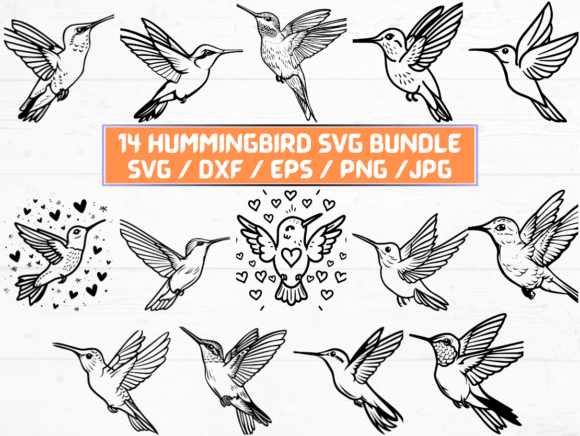
The moment I loaded one of the SVG files into my embroidery digitizing software, the shape struck me: balanced wings, a gentle curve to the beak, subtle negative space around the tail feathers. It doesn’t scream “busy.” Instead, it breathes—like a hummingbird hovering mid-air. That’s rare. Many floral or wildlife embroidery files lean too illustrative, packing in detail that collapses into muddy fill stitch at 3” wide. This one feels intentionally edited: clean silhouette, intentional line weight, and just enough contour to suggest motion without demanding ultra-fine thread control.
I immediately pictured it on a natural cotton tote bag—centered above a hand-stitched label—and on a soft organic cotton baby blanket, where simplicity reads as tenderness. It’s not a “statement” hummingbird. It’s a thoughtful one.
Where It Shines (and Where It Asks for Care)
In real embroidery use, the Hummingbird SVG File performs best when treated like a quiet collaborator—not a plug-and-play hero. Here’s how it landed across my recent test projects:
- Tote bags & tea towels: Excellent. The open wing shape distributes well across medium-density weave. No puckering when paired with medium-weight cutaway stabilizer. Works beautifully in monochrome thread (navy on oat, sage on cream) for a cohesive boutique look.
- Sweatshirts & hoodies: Solid—but only with proper backing. I used tear-away + light cutaway on a midweight French terry, and the wingtips stayed crisp. Avoid heavy fleece unless you reduce stitch density manually; dense fill areas can flatten texture.
- Baby items & nursery decor: Ideal. Its gentle scale and lack of tiny interior details mean no skipped stitches on delicate interlock knit. I embroidered it on a bamboo-cotton onesie using 40wt pastel thread—soft, legible, and wash-tested twice with zero fraying.
- Caps & curved surfaces: Use caution. The lower wing edge and tail taper closely. On a structured cap front, I resized it to 2.2” max width and ran a quick test hoop on scrap twill. It held—but wouldn’t recommend going smaller than 2” without checking stitch paths in your embroidery software first.
- Patches & layered garments: Strong candidate for iron-on or sewn-on patches. The clean outer edge makes cutting and finishing tidy. Just confirm your applique design (if converting) preserves that subtle wing contour—it’s what gives the piece its personality.
What You’ll Want to Check Before Stitching
This isn’t a “load-and-go” embroidery file—and that’s actually a strength. It invites intentionality. Before committing to your first client project or batch production, do these five things:
- Test on scrap fabric that matches your final product—especially if using textured weaves, stretch knits, or dark fabrics. The PNGs are sharp at 300 dpi, but thread behavior on black denim versus ivory linen is wildly different.
- Review stitch density in your embroidery software. Some versions of the same design run denser than others. If your machine struggles with tight fill areas, simplify small feather zones manually—or ask your digitizer to adjust.
- Confirm hoop size compatibility. At full size, it fits comfortably in a 4”x4” hoop—but if you’re scaling down for baby caps or wristbands, verify the smallest detail (like the beak tip) remains stitchable at your machine’s minimum jump distance.
- Try black-and-white mockups. Since this is a Graphics asset first, preview it in grayscale on both light and dark backgrounds. Does the silhouette still read? Does the balance hold? (It does—cleanly.)
- Check licensing before selling finished products. The listing says “INSTANT DOWNLOAD” and lists formats—but doesn’t specify commercial use rights. If you’re an Etsy seller or craft business owner, verify whether resale of embroidered items is permitted. When in doubt, contact the creator.
Why It Builds Trust—Not Just Texture
Here’s what matters most to buyers: Does it feel handmade, not mass-produced? The Hummingbird SVG File lands in that sweet spot. It’s detailed enough to reward close looking—a slight curve in the wing, a tapered tail—but restrained enough to avoid looking “designed by committee.” Customers notice that. On a personalized gift, it reads as considered. On a small shop product, it signals care—not just craft.
I’ve seen hummingbird designs fall flat when over-digitized: too many satin borders, excessive underlay, or cluttered background elements. This one avoids all that. It lets the stitch quality—and your choice of thread color—do the speaking. That builds customer trust faster than any tagline.
A Final Note for Creative Entrepreneurs
If you sell digital embroidery files yourself—or curate design assets for your craft business—the Hummingbird SVG File is worth studying as a case study in restraint. Its 14 SVG, 14 PNG, 14 DXF, 14 JPG, and 14 EPS files give flexibility across platforms and workflows. But more importantly, its visual voice stays consistent across formats. That consistency is what makes a design feel professional, not fragmented.
Whether you’re prepping for a holiday craft fair, building a cohesive line of nursery embroidery, or sourcing reliable Crafts assets for client work, this hummingbird doesn’t shout. It hums—and that’s exactly why it works.